Be.Ark: agent automation,
from browsing to documents
Your agent checks what it needs on the web, then creates and edits HWP, PowerPoint, Word, and Excel files. It can also automate email, social media channels, and sites you log in to.
Beta 1.9.5 · Free to start · Intel MacLook it up, write it up, send it
Research, writing, and email happen in one conversation. Nothing is sent without your approval.
Your agent opens sites in the in-app browser and reads what it needs.
It combines what it read with what you've saved, and turns it into HWP, PowerPoint, Word, or Excel.
It shows you the email draft with the document attached. It sends only after you approve.
Open the files you already use
No need to convert anything. Your agent reads, edits, and saves the original file.
Give it one template and your agent reads its design and structure. It makes proposals and summaries in the same template.
- Redesign an existing deck with design presets
- Write in your template, in the same tone and flow
- The more you use it, the more it builds decks your way
It fills in the forms you receive and edits their tables. Open and save them right in the app.
- Keeps the form's fonts and table layout
- Edits the cells and text you choose
- You can edit directly in the app, too
Depending on your request and context, it drafts a new document or edits an existing one.
- Keeps formatting and numbering
- Edits the tables and paragraphs you choose
- See changes on screen right away
Your agent reads the sheet and fills in values. Formulas stay, and they recalculate when you open the file.
- From a single cell to a whole table
- Keeps formulas and merged cells
- Creates new files from table data
It recognizes text in photographed contracts and old records, and uses it in your document work.
- Reads text PDFs as they are
- Recognizes text in the first 8 pages of a scan
Your agent edits tables and to-dos. See the result on screen right away.
- Shows tables and to-do lists cleanly
- Changes only what you asked for
- You can edit directly in the app, too
All of this is free
Now you don't have to pay for expensive software subscriptions.
And work more comfortably with your agent.
Create your first agent in 3 minutes
The app guides you step by step. Watch the video first, then follow along.
- 01Pick the job
Choose from 10 roles such as planning, design, and production. Or start with a blank teammate.
- 02Choose a name and face
Name your agent and pick a name color. You can change them later.
- 03Sign in with the AI you already use
Sign in with your Claude or ChatGPT account. You can also pick a model that runs on your computer.
- 04Introduce yourself
Write what to call you and what you do. Your agent answers with that in mind.
- 05Connect a work folder
Pick the folder where your agent creates and saves documents.
- 06Take the tour
The app walks you through the agent list, sessions, settings, chat, and the document workspace.
Your agent data is stored on your computer
Unlike existing agent services, core data isn't stored on a server.
Your agent's ontology is stored on your computer, and it grows into an agent that knows you better.
Download your agent data as a .rebe file to keep or copy it anytime.
You don't have to worry about your agent data piling up on a company's servers.
Files and work history are saved on your computer. We don't keep your documents on our servers.
It remembers your usual templates, your tone, and past decisions. No need to explain every time.
Keep your agent in a single .rebe file. Restore it from that file on a new computer.
Choose a Claude or ChatGPT subscription, or a model running on your computer. The memory lives on your computer, so it carries over.
Creative Studio comes with Pro
Skills for specialist work like strategy research and storyboards. Included in Pro, with new skills added regularly.
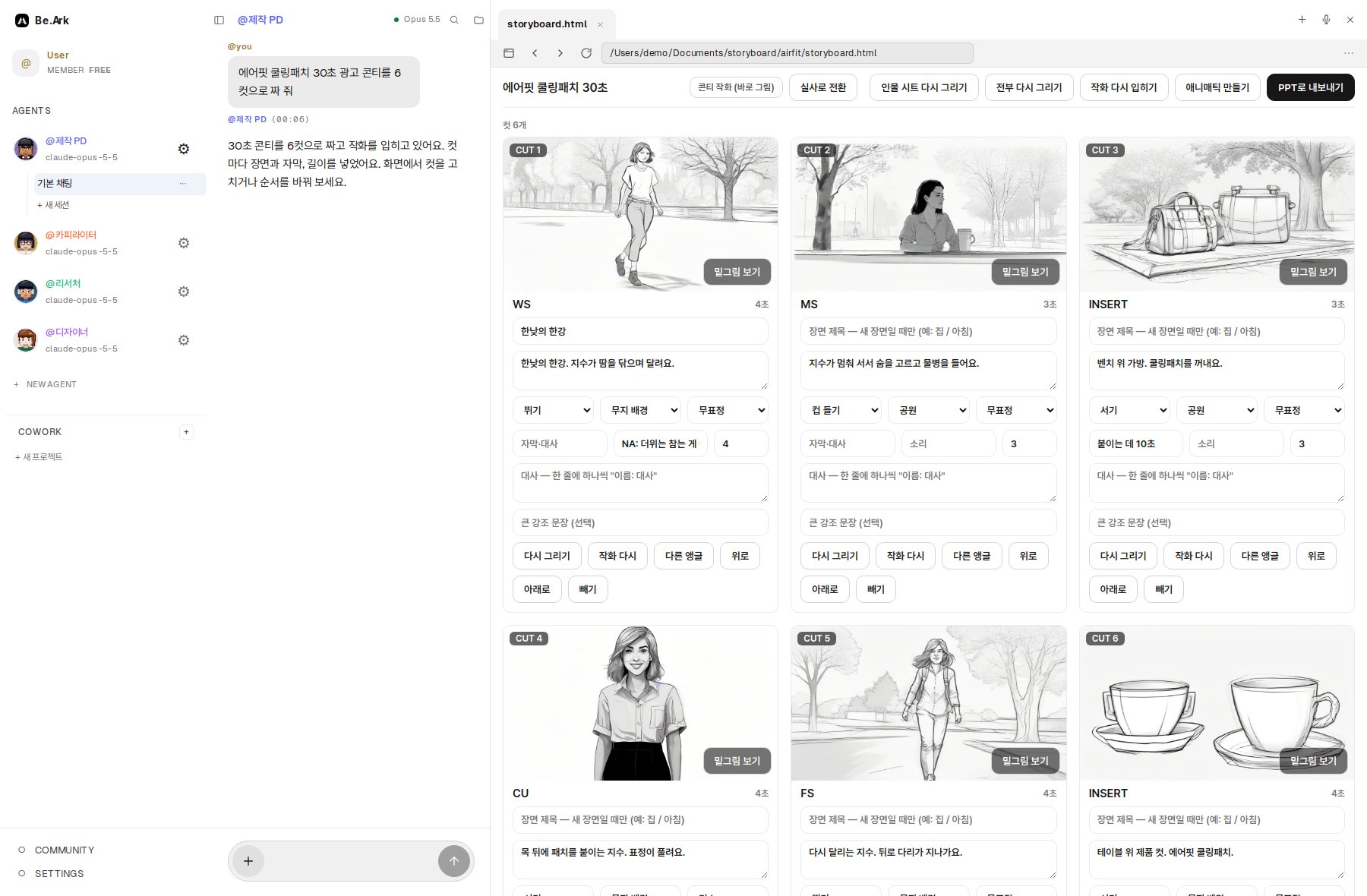
Break a brief into cuts and draw storyboard sketches. Edit the cuts on screen and export to PowerPoint.
Gather and organize material stage by stage. Turn it into a strategy proposal deck.
Reads and summarizes campaign performance from your Meta Ads account. Coming soon.
Document work is free
HWP, PowerPoint, Word, and Excel work is all included in the Free plan.
- Create as many agents as you want
- Create and edit HWP, PowerPoint, Word, and Excel
- Use a Claude or ChatGPT subscription, or a local model
- Memory and files stored on your computer
- Everything in Free
- Creative Studio skills
- Download community skills
- 300 built-in web searches a day
- 600 minutes a month of live interpretation and transcription
- Everything in Pro
- Custom deployment and onboarding
- Organization-level management
- Dedicated support
Better every week
Start with the document you're working on
Install, open a file, and you're ready.